


注意
此示例與 Gymnasium 1.2.0 版本相容。
使用表格型Q-學習解決21點問題
本教程使用表格型Q-學習訓練一個玩21點的智慧體。
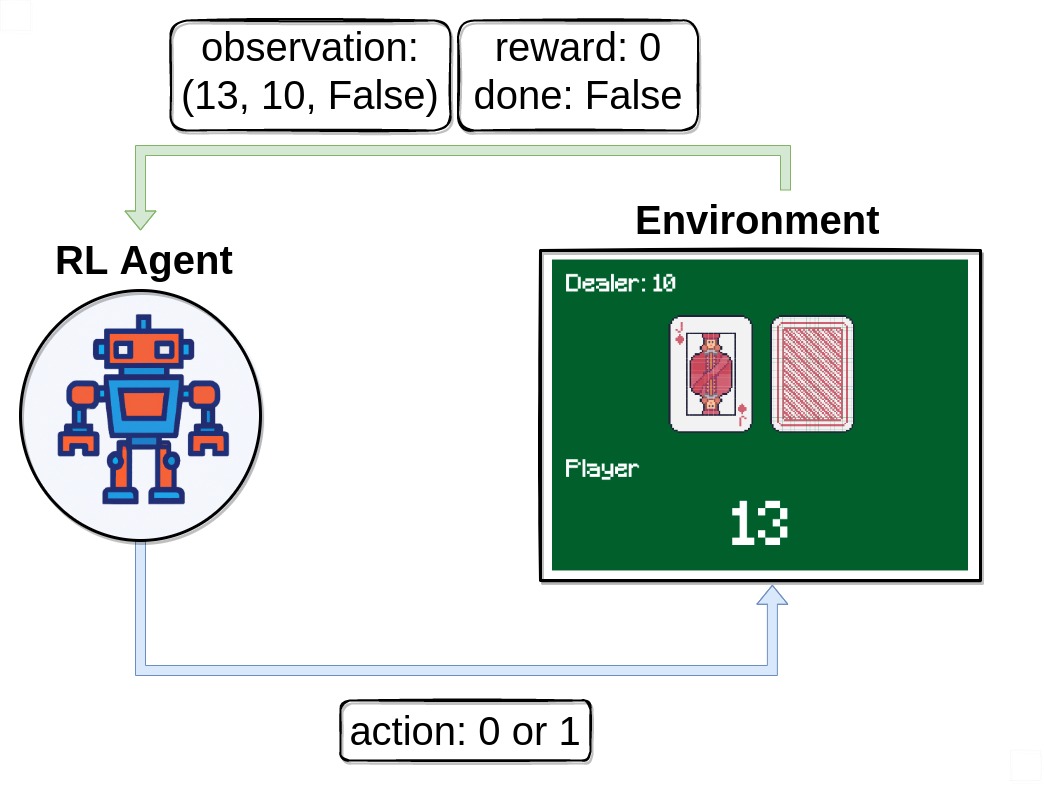
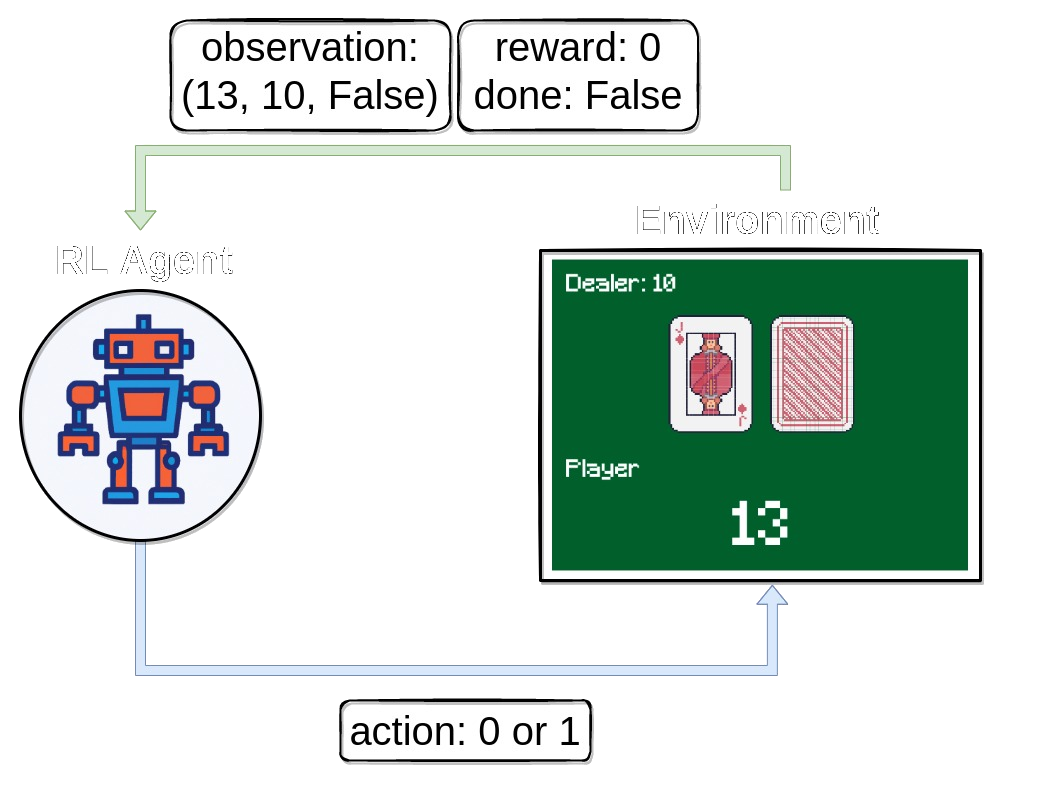
在本教程中,我們將探索並解決 Blackjack-v1 環境。
21點 是最受歡迎的賭場紙牌遊戲之一,也因在某些條件下可被擊敗而聞名。此版本遊戲使用無限牌堆(我們抽牌時會放回),因此在我們的模擬遊戲中,算牌不是一個可行的策略。完整文件可在 https://gymnasium.llms.tw/environments/toy_text/blackjack 找到
目標:要獲勝,您的牌點數總和應大於莊家,且不超過21點。
- 行動:智慧體可以選擇兩種行動
停牌 (0):玩家不再要牌
要牌 (1):玩家將獲得另一張牌,但玩家可能會超過21點而爆牌
方法:要自行解決此環境,您可以選擇您喜歡的離散RL演算法。本文提出的解決方案使用了 Q-學習(一種無模型RL演算法)。
匯入和環境設定
# Author: Till Zemann
# License: MIT License

from __future__ import annotations

from collections import defaultdict

import matplotlib.pyplot as plt
import numpy as np
import seaborn as sns
from matplotlib.patches import Patch
from tqdm import tqdm

import gymnasium as gym


# Let's start by creating the blackjack environment.
# Note: We are going to follow the rules from Sutton & Barto.
# Other versions of the game can be found below for you to experiment.

env = gym.make("Blackjack-v1", sab=True)
# Other possible environment configurations are:

env = gym.make('Blackjack-v1', natural=True, sab=False)
# Whether to give an additional reward for starting with a natural blackjack, i.e. starting with an ace and ten (sum is 21).

env = gym.make('Blackjack-v1', natural=False, sab=False)
# Whether to follow the exact rules outlined in the book by Sutton and Barto. If `sab` is `True`, the keyword argument `natural` will be ignored.
觀察環境
首先,我們呼叫 env.reset() 來開始一個回合。此函式將環境重置到起始位置並返回一個初始 observation。我們通常還會將 done = False。此變數稍後將用於檢查遊戲是否已終止(即玩家贏或輸)。
# reset the environment to get the first observation
done = False
observation, info = env.reset()

# observation = (16, 9, False)
請注意,我們的觀測是一個包含3個值的3元組
玩家當前的點數總和
莊家明牌的點數
玩家是否持有可用A的布林值(如果A計作11點而不會爆牌,則該A可用)
執行行動
在收到我們的第一個觀測後,我們將只使用 env.step(action) 函式與環境互動。此函式將一個行動作為輸入並在環境中執行它。因為該行動會改變環境的狀態,它會返回四個有用的變數給我們。它們是
next_state:這是智慧體採取行動後將收到的觀測。reward:這是智慧體採取行動後將收到的獎勵。terminated:這是一個布林變數,指示環境是否已終止。truncated:這是一個布林變數,也指示回合是否因提前截斷而結束,即達到時間限制。info:這是一個字典,可能包含有關環境的額外資訊。
next_state、reward、terminated 和 truncated 變數不言自明,但 info 變數需要一些額外的解釋。此變數包含一個字典,其中可能包含有關環境的一些額外資訊,但在 Blackjack-v1 環境中您可以忽略它。例如,在雅達利環境中,info 字典有一個 ale.lives 鍵,它告訴我們智慧體還剩下多少條生命。如果智慧體生命為0,則該回合結束。
請注意,在訓練迴圈中呼叫 env.render() 不是一個好主意,因為渲染會大大減慢訓練速度。不如嘗試構建一個額外的迴圈,在訓練後評估和展示智慧體。
# sample a random action from all valid actions
action = env.action_space.sample()
# action=1

# execute the action in our environment and receive infos from the environment
observation, reward, terminated, truncated, info = env.step(action)

# observation=(24, 10, False)
# reward=-1.0
# terminated=True
# truncated=False
# info={}
一旦 terminated = True 或 truncated=True,我們應該停止當前回合,並使用 env.reset() 開始新回合。如果您在不重置環境的情況下繼續執行行動,它仍然會響應,但輸出對訓練沒有用(如果智慧體在無效資料上學習,甚至可能有害)。
構建智慧體
讓我們構建一個 Q-學習 智慧體 來解決 *Blackjack-v1*!我們將需要一些函式來選擇行動和更新智慧體的行動值。為了確保智慧體探索環境,一個可能的解決方案是 epsilon-greedy 策略,我們以 epsilon 的百分比選擇一個隨機行動,並以 1 - epsilon 的百分比選擇貪婪行動(當前被認為是最好的行動)。
class BlackjackAgent:
    def __init__(
        self,
        env,
        learning_rate: float,
        initial_epsilon: float,
        epsilon_decay: float,
        final_epsilon: float,
        discount_factor: float = 0.95,
    ):
        """Initialize a Reinforcement Learning agent with an empty dictionary
        of state-action values (q_values), a learning rate and an epsilon.

        Args:
            learning_rate: The learning rate
            initial_epsilon: The initial epsilon value
            epsilon_decay: The decay for epsilon
            final_epsilon: The final epsilon value
            discount_factor: The discount factor for computing the Q-value
        """
        self.q_values = defaultdict(lambda: np.zeros(env.action_space.n))

        self.lr = learning_rate
        self.discount_factor = discount_factor

        self.epsilon = initial_epsilon
        self.epsilon_decay = epsilon_decay
        self.final_epsilon = final_epsilon

        self.training_error = []

    def get_action(self, env, obs: tuple[int, int, bool]) -> int:
        """
        Returns the best action with probability (1 - epsilon)
        otherwise a random action with probability epsilon to ensure exploration.
        """
        # with probability epsilon return a random action to explore the environment
        if np.random.random() < self.epsilon:
            return env.action_space.sample()

        # with probability (1 - epsilon) act greedily (exploit)
        else:
            return int(np.argmax(self.q_values[obs]))

    def update(
        self,
        obs: tuple[int, int, bool],
        action: int,
        reward: float,
        terminated: bool,
        next_obs: tuple[int, int, bool],
    ):
        """Updates the Q-value of an action."""
        future_q_value = (not terminated) * np.max(self.q_values[next_obs])
        temporal_difference = (
            reward + self.discount_factor * future_q_value - self.q_values[obs][action]
        )

        self.q_values[obs][action] = (
            self.q_values[obs][action] + self.lr * temporal_difference
        )
        self.training_error.append(temporal_difference)

    def decay_epsilon(self):
        self.epsilon = max(self.final_epsilon, self.epsilon - self.epsilon_decay)
為了訓練智慧體,我們將讓智慧體一次玩一個回合(一個完整的遊戲稱為一個回合),然後在每個步驟(遊戲中的一個單獨行動稱為一個步驟)之後更新其Q值。
智慧體需要經歷大量回合才能充分探索環境。
現在我們應該準備好構建訓練迴圈了。
# hyperparameters
learning_rate = 0.01
n_episodes = 100_000
start_epsilon = 1.0
epsilon_decay = start_epsilon / (n_episodes / 2)  # reduce the exploration over time
final_epsilon = 0.1

agent = BlackjackAgent(
    env=env,
    learning_rate=learning_rate,
    initial_epsilon=start_epsilon,
    epsilon_decay=epsilon_decay,
    final_epsilon=final_epsilon,
)
太棒了,開始訓練吧!
資訊:當前的超引數設定旨在快速訓練一個不錯的智慧體。如果您想收斂到最優策略,請嘗試將 n_episodes 增加10倍並降低 learning_rate(例如,降至0.001)。
env = gym.wrappers.RecordEpisodeStatistics(env, buffer_length=n_episodes)
for episode in tqdm(range(n_episodes)):
    obs, info = env.reset()
    done = False

    # play one episode
    while not done:
        action = agent.get_action(env, obs)
        next_obs, reward, terminated, truncated, info = env.step(action)

        # update the agent
        agent.update(obs, action, reward, terminated, next_obs)

        # update if the environment is done and the current obs
        done = terminated or truncated
        obs = next_obs

    agent.decay_epsilon()
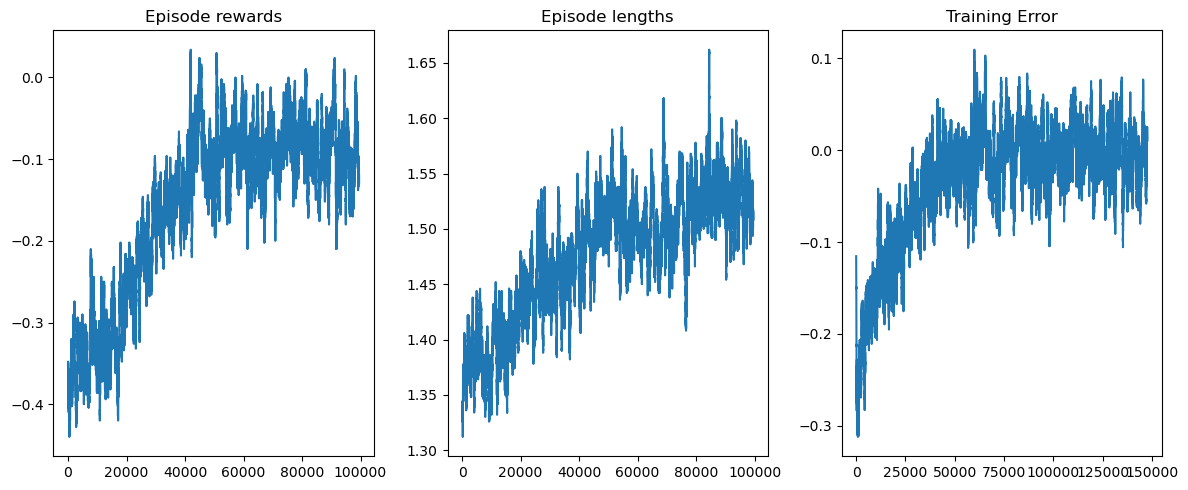
視覺化訓練過程
rolling_length = 500
fig, axs = plt.subplots(ncols=3, figsize=(12, 5))
axs[0].set_title("Episode rewards")
# compute and assign a rolling average of the data to provide a smoother graph
reward_moving_average = (
    np.convolve(
        np.array(env.return_queue).flatten(), np.ones(rolling_length), mode="valid"
    )
    / rolling_length
)
axs[0].plot(range(len(reward_moving_average)), reward_moving_average)
axs[1].set_title("Episode lengths")
length_moving_average = (
    np.convolve(
        np.array(env.length_queue).flatten(), np.ones(rolling_length), mode="same"
    )
    / rolling_length
)
axs[1].plot(range(len(length_moving_average)), length_moving_average)
axs[2].set_title("Training Error")
training_error_moving_average = (
    np.convolve(np.array(agent.training_error), np.ones(rolling_length), mode="same")
    / rolling_length
)
axs[2].plot(range(len(training_error_moving_average)), training_error_moving_average)
plt.tight_layout()
plt.show()
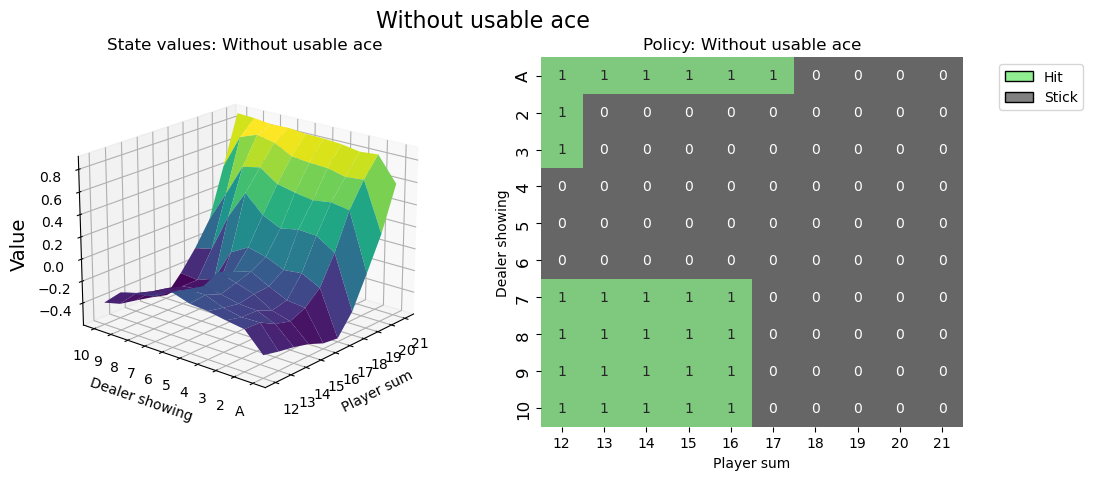
視覺化策略
def create_grids(agent, usable_ace=False):
    """Create value and policy grid given an agent."""
    # convert our state-action values to state values
    # and build a policy dictionary that maps observations to actions
    state_value = defaultdict(float)
    policy = defaultdict(int)
    for obs, action_values in agent.q_values.items():
        state_value[obs] = float(np.max(action_values))
        policy[obs] = int(np.argmax(action_values))

    player_count, dealer_count = np.meshgrid(
        # players count, dealers face-up card
        np.arange(12, 22),
        np.arange(1, 11),
    )

    # create the value grid for plotting
    value = np.apply_along_axis(
        lambda obs: state_value[(obs[0], obs[1], usable_ace)],
        axis=2,
        arr=np.dstack([player_count, dealer_count]),
    )
    value_grid = player_count, dealer_count, value

    # create the policy grid for plotting
    policy_grid = np.apply_along_axis(
        lambda obs: policy[(obs[0], obs[1], usable_ace)],
        axis=2,
        arr=np.dstack([player_count, dealer_count]),
    )
    return value_grid, policy_grid


def create_plots(value_grid, policy_grid, title: str):
    """Creates a plot using a value and policy grid."""
    # create a new figure with 2 subplots (left: state values, right: policy)
    player_count, dealer_count, value = value_grid
    fig = plt.figure(figsize=plt.figaspect(0.4))
    fig.suptitle(title, fontsize=16)

    # plot the state values
    ax1 = fig.add_subplot(1, 2, 1, projection="3d")
    ax1.plot_surface(
        player_count,
        dealer_count,
        value,
        rstride=1,
        cstride=1,
        cmap="viridis",
        edgecolor="none",
    )
    plt.xticks(range(12, 22), range(12, 22))
    plt.yticks(range(1, 11), ["A"] + list(range(2, 11)))
    ax1.set_title(f"State values: {title}")
    ax1.set_xlabel("Player sum")
    ax1.set_ylabel("Dealer showing")
    ax1.zaxis.set_rotate_label(False)
    ax1.set_zlabel("Value", fontsize=14, rotation=90)
    ax1.view_init(20, 220)

    # plot the policy
    fig.add_subplot(1, 2, 2)
    ax2 = sns.heatmap(policy_grid, linewidth=0, annot=True, cmap="Accent_r", cbar=False)
    ax2.set_title(f"Policy: {title}")
    ax2.set_xlabel("Player sum")
    ax2.set_ylabel("Dealer showing")
    ax2.set_xticklabels(range(12, 22))
    ax2.set_yticklabels(["A"] + list(range(2, 11)), fontsize=12)

    # add a legend
    legend_elements = [
        Patch(facecolor="lightgreen", edgecolor="black", label="Hit"),
        Patch(facecolor="grey", edgecolor="black", label="Stick"),
    ]
    ax2.legend(handles=legend_elements, bbox_to_anchor=(1.3, 1))
    return fig


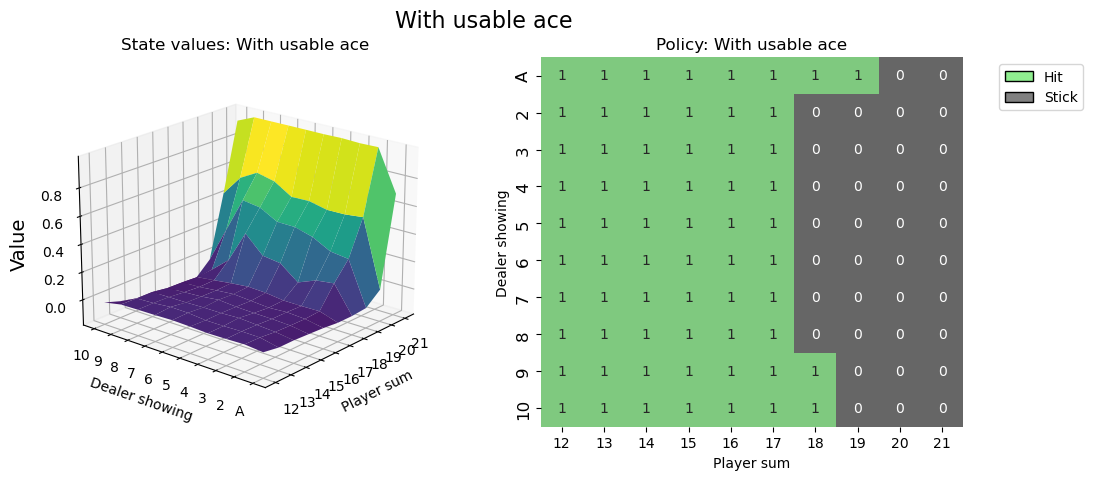
# state values & policy with usable ace (ace counts as 11)
value_grid, policy_grid = create_grids(agent, usable_ace=True)
fig1 = create_plots(value_grid, policy_grid, title="With usable ace")
plt.show()
# state values & policy without usable ace (ace counts as 1)
value_grid, policy_grid = create_grids(agent, usable_ace=False)
fig2 = create_plots(value_grid, policy_grid, title="Without usable ace")
plt.show()
在指令碼結束時呼叫 env.close() 是一個好習慣,這樣環境使用的任何資源都將被關閉。
你覺得你能做得更好嗎?
# You can visualize the environment using the play function
# and try to win a few games.
希望本教程能幫助您掌握如何與 OpenAI-Gym 環境互動,並開啟您解決更多RL挑戰的旅程。
建議您自行解決此環境(專案式學習非常有效!)。您可以應用您喜歡的離散RL演算法,或者嘗試蒙特卡洛ES(在 Sutton & Barto 第5.3節中介紹)——這樣您可以將您的結果直接與書中內容進行比較。
祝您玩得愉快!