


注意
本示例相容 Gymnasium 1.2.0 版。
載入自定義四足機器人環境
在本教程中,你將使用模型檔案(以 .xml 結尾)建立一個 MuJoCo 四足機器人行走環境,而無需建立新的類。
步驟
- 獲取你的機器人的 MJCF(或 URDF)模型檔案。
建立你自己的模型(參見 MuJoCo 指南),或者,
尋找一個現成的模型(在本教程中,我們將使用 MuJoCo Menagerie 集合中的一個模型)。
使用 xml_file 引數載入模型。
- 調整環境引數以獲得所需的行為。
調整環境模擬引數。
調整環境終止引數。
調整環境獎勵引數。
調整環境觀測引數。
訓練智慧體來移動你的機器人。
# The reader is expected to be familiar with the `Gymnasium` API & library, the basics of robotics,
# and the included `Gymnasium/MuJoCo` environments with the robot model they use.
# Familiarity with the **MJCF** file model format and the `MuJoCo` simulator is not required but is recommended.
設定
我們需求 gymnasium>=1.0.0。
import numpy as np

import gymnasium as gym


# Make sure Gymnasium is properly installed
# You can run this in your terminal:
# pip install "gymnasium>=1.0.0"
步驟 0.1 - 下載機器人模型
在本教程中,我們將從優秀的 MuJoCo Menagerie 機器人模型集合中載入 Unitree Go1 機器人。Go1 是一種四足機器人,控制它移動是一個重要的學習問題,比 Gymnasium/MuJoCo/Ant 環境難得多。
注意:原始教程包含一張 Unitree Go1 機器人在平坦地形場景中的圖片。你可以在以下連結檢視此圖片:https://github.com/google-deepmind/mujoco_menagerie/blob/main/unitree_go1/go1.png?raw=true
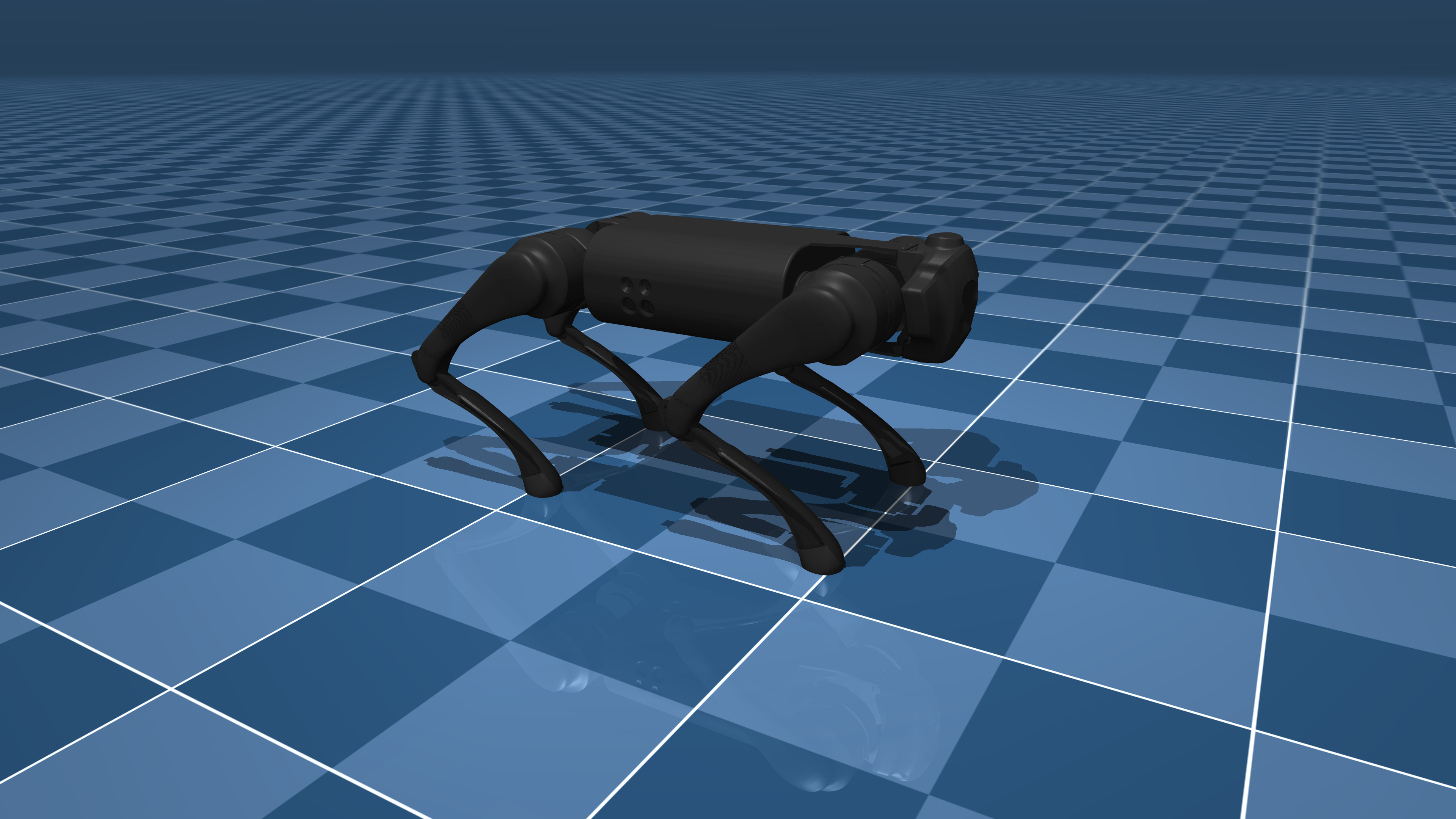
# You can download the whole MuJoCo Menagerie collection (which includes `Go1`):
# git clone https://github.com/google-deepmind/mujoco_menagerie.git

# You can use any other quadruped robot with this tutorial, just adjust the environment parameter values for your robot.
步驟 1 - 載入模型
要載入模型,我們只需在 Ant-v5 框架中使用 xml_file 引數。
# Basic loading (uncomment to use)
# env = gym.make('Ant-v5', xml_file='./mujoco_menagerie/unitree_go1/scene.xml')

# Although this is enough to load the model, we will need to tweak some environment parameters
# to get the desired behavior for our environment, so we will also explicitly set the simulation,
# termination, reward and observation arguments, which we will tweak in the next step.

env = gym.make(
    "Ant-v5",
    xml_file="./mujoco_menagerie/unitree_go1/scene.xml",
    forward_reward_weight=0,
    ctrl_cost_weight=0,
    contact_cost_weight=0,
    healthy_reward=0,
    main_body=1,
    healthy_z_range=(0, np.inf),
    include_cfrc_ext_in_observation=True,
    exclude_current_positions_from_observation=False,
    reset_noise_scale=0,
    frame_skip=1,
    max_episode_steps=1000,
)
步驟 2 - 調整環境引數
調整環境引數對於獲得所需的學習行為至關重要。在以下小節中,建議讀者查閱引數文件以獲取更詳細的資訊。
步驟 2.1 - 調整環境模擬引數
相關的引數是 frame_skip、reset_noise_scale 和 max_episode_steps。
# We want to tweak the `frame_skip` parameter to get `dt` to an acceptable value
# (typical values are `dt` ∈ [0.01, 0.1] seconds),

# Reminder: dt = frame_skip × model.opt.timestep, where `model.opt.timestep` is the integrator
# time step selected in the MJCF model file.

# The `Go1` model we are using has an integrator timestep of `0.002`, so by selecting
# `frame_skip=25` we can set the value of `dt` to `0.05s`.

# To avoid overfitting the policy, `reset_noise_scale` should be set to a value appropriate
# to the size of the robot, we want the value to be as large as possible without the initial
# distribution of states being invalid (`Terminal` regardless of control actions),
# for `Go1` we choose a value of `0.1`.

# And `max_episode_steps` determines the number of steps per episode before `truncation`,
# here we set it to 1000 to be consistent with the based `Gymnasium/MuJoCo` environments,
# but if you need something higher you can set it so.

env = gym.make(
    "Ant-v5",
    xml_file="./mujoco_menagerie/unitree_go1/scene.xml",
    forward_reward_weight=0,
    ctrl_cost_weight=0,
    contact_cost_weight=0,
    healthy_reward=0,
    main_body=1,
    healthy_z_range=(0, np.inf),
    include_cfrc_ext_in_observation=True,
    exclude_current_positions_from_observation=False,
    reset_noise_scale=0.1,  # set to avoid policy overfitting
    frame_skip=25,  # set dt=0.05
    max_episode_steps=1000,  # kept at 1000
)
步驟 2.2 - 調整環境終止引數
終止對於機器人環境很重要,可以避免取樣“無用”的時間步。
# The arguments of interest are `terminate_when_unhealthy` and `healthy_z_range`.

# We want to set `healthy_z_range` to terminate the environment when the robot falls over,
# or jumps really high, here we have to choose a value that is logical for the height of the robot,
# for `Go1` we choose `(0.195, 0.75)`.
# Note: `healthy_z_range` checks the absolute value of the height of the robot,
# so if your scene contains different levels of elevation it should be set to `(-np.inf, np.inf)`

# We could also set `terminate_when_unhealthy=False` to disable termination altogether,
# which is not desirable in the case of `Go1`.

env = gym.make(
    "Ant-v5",
    xml_file="./mujoco_menagerie/unitree_go1/scene.xml",
    forward_reward_weight=0,
    ctrl_cost_weight=0,
    contact_cost_weight=0,
    healthy_reward=0,
    main_body=1,
    healthy_z_range=(
        0.195,
        0.75,
    ),  # set to avoid sampling steps where the robot has fallen or jumped too high
    include_cfrc_ext_in_observation=True,
    exclude_current_positions_from_observation=False,
    reset_noise_scale=0.1,
    frame_skip=25,
    max_episode_steps=1000,
)

# Note: If you need a different termination condition, you can write your own `TerminationWrapper`
# (see the documentation).
步驟 2.3 - 調整環境獎勵引數
相關的引數是 forward_reward_weight、ctrl_cost_weight、contact_cost_weight、healthy_reward 和 main_body。
# For the arguments `forward_reward_weight`, `ctrl_cost_weight`, `contact_cost_weight` and `healthy_reward`
# we have to pick values that make sense for our robot, you can use the default `MuJoCo/Ant`
# parameters for references and tweak them if a change is needed for your environment.
# In the case of `Go1` we only change the `ctrl_cost_weight` since it has a higher actuator force range.

# For the argument `main_body` we have to choose which body part is the main body
# (usually called something like "torso" or "trunk" in the model file) for the calculation
# of the `forward_reward`, in the case of `Go1` it is the `"trunk"`
# (Note: in most cases including this one, it can be left at the default value).

env = gym.make(
    "Ant-v5",
    xml_file="./mujoco_menagerie/unitree_go1/scene.xml",
    forward_reward_weight=1,  # kept the same as the 'Ant' environment
    ctrl_cost_weight=0.05,  # changed because of the stronger motors of `Go1`
    contact_cost_weight=5e-4,  # kept the same as the 'Ant' environment
    healthy_reward=1,  # kept the same as the 'Ant' environment
    main_body=1,  # represents the "trunk" of the `Go1` robot
    healthy_z_range=(0.195, 0.75),
    include_cfrc_ext_in_observation=True,
    exclude_current_positions_from_observation=False,
    reset_noise_scale=0.1,
    frame_skip=25,
    max_episode_steps=1000,
)

# Note: If you need a different reward function, you can write your own `RewardWrapper`
# (see the documentation).
步驟 2.4 - 調整環境觀測引數
相關的引數是 include_cfrc_ext_in_observation 和 exclude_current_positions_from_observation。
# Here for `Go1` we have no particular reason to change them.

env = gym.make(
    "Ant-v5",
    xml_file="./mujoco_menagerie/unitree_go1/scene.xml",
    forward_reward_weight=1,
    ctrl_cost_weight=0.05,
    contact_cost_weight=5e-4,
    healthy_reward=1,
    main_body=1,
    healthy_z_range=(0.195, 0.75),
    include_cfrc_ext_in_observation=True,  # kept the same as the 'Ant' environment
    exclude_current_positions_from_observation=False,  # kept the same as the 'Ant' environment
    reset_noise_scale=0.1,
    frame_skip=25,
    max_episode_steps=1000,
)


# Note: If you need additional observation elements (such as additional sensors),
# you can write your own `ObservationWrapper` (see the documentation).
步驟 3 - 訓練你的智慧體
最後,我們完成了,可以使用強化學習(RL)演算法訓練一個智慧體來讓 Go1 機器人行走/奔跑。注意:如果你使用自己的機器人模型遵循了本指南,你可能會在訓練過程中發現某些環境引數不符合預期,請隨時返回步驟 2 進行必要的更改。
def main():
    """Run the final Go1 environment setup."""
    # Note: The original tutorial includes an image showing the Go1 robot in the environment.
    # The image is available at: https://github.com/Kallinteris-Andreas/Gymnasium-kalli/assets/30759571/bf1797a3-264d-47de-b14c-e3c16072f695

    env = gym.make(
        "Ant-v5",
        xml_file="./mujoco_menagerie/unitree_go1/scene.xml",
        forward_reward_weight=1,
        ctrl_cost_weight=0.05,
        contact_cost_weight=5e-4,
        healthy_reward=1,
        main_body=1,
        healthy_z_range=(0.195, 0.75),
        include_cfrc_ext_in_observation=True,
        exclude_current_positions_from_observation=False,
        reset_noise_scale=0.1,
        frame_skip=25,
        max_episode_steps=1000,
        render_mode="rgb_array",  # Change to "human" to visualize
    )

    # Example of running the environment for a few steps
    obs, info = env.reset()

    for _ in range(100):
        action = env.action_space.sample()  # Replace with your agent's action
        obs, reward, terminated, truncated, info = env.step(action)

        if terminated or truncated:
            obs, info = env.reset()

    env.close()
    print("Environment tested successfully!")

    # Now you would typically:
    # 1. Set up your RL algorithm
    # 2. Train the agent
    # 3. Evaluate the agent's performance
結語
你可以按照本指南建立大多數四足環境。要建立類人型/雙足機器人,你也可以使用 Gymnasium/MuJoCo/Humnaoid-v5 框架遵循本指南。
注意:原始教程包含一段訓練好的 Go1 機器人行走的影片演示。影片顯示該機器人根據製造商的資料,最高速度可達 4.7 米/秒。在原始教程中,此影片嵌入自:https://odysee.com/$/embed/@Kallinteris-Andreas:7/video0-step-0-to-step-1000:1?r=6fn5jA9uZQUZXGKVpwtqjz1eyJcS3hj3
# Author: @kallinteris-andreas (https://github.com/Kallinteris-Andreas)